
In M00 you ran a prepared simulation. Now you will make the model stop being a rigid sequence: will receive inputs, check if they make sense, and make their first engineering decision.
YOUR MISSION
The beam cannot exceed 0,25 mm deflection or 150 MPa. Among several candidate heights, which is the lowest you meet?
When finished, the script will vouch for you. But first you will have to teach him what each number means.
Objectives
By completing M01 you will be able to demonstrate that:
- Replace scattered numbers with parameters with physical meaning and known units.
- You distinguish inputs, derived quantities, analytical references and FEA results.
- You build APDL expressions and predict their trend before executing.
- You stop invalid entries by
*IF. - You define an array with
*DIMand you walk through it using*DO. - You generate a table CSV and select the first admissible alternative.
Prerequisites and files
Module kit
Download every .mac script and .csv contract for this module in a single
file. Unzip the contents into your Working Directory before running MAPDL.
m01-kit.zip
· main deliverable: 01_parametric_beam.mac
- Have completed M00 or recognize flow
/PREP7 → /SOLU → /POST1. - Know the meaning of elastic modulus, moment of inertia, and deflection.
- Work with the coherent system SI: meters, newtons and pascals.
01_start.macStarting point.01_parametric_beam.mac— guided solution.01_bug_hunt.mac— five deliberate defects.01_challenge.mac— challenge template.01_expected_results.csvAuto Correction
How to use this lesson
| Route | Duration | Stroke |
|---|---|---|
| First win | 25–30 min | Prediction, basic parameters and first execution with analytical references. |
| Complete | 60–70 min | In addition, arrays, loops, bug hunting, challenge and CSV evidence. |
Recommendation: Calculate uy_ref and sigma_ref on paper before running. Prediction converts simulation in a falsifiable test, not in an outline to look at passively.
Session map
- Mission: objectives, downloads and analytical prediction.
- Mental models the parametric script contract.
- Demonstration: parameters, validation, arrays and loops.
- Error hunting: diagnose parametric failures.
- Challenge: modify a variable with verifiable tolerance.
- Mastery: final test that records demonstrated mastery and recommends M02.
Before you code — Make a prediction
In M00 the height was 0.10 m. Imagine that we duplicate it:
beam_h=0.20Will the deflection be one-half, one-quarter, or one-eighth?
For a rectangular section:
I = B·H³/12
uy = P·L³/(3·E·I)
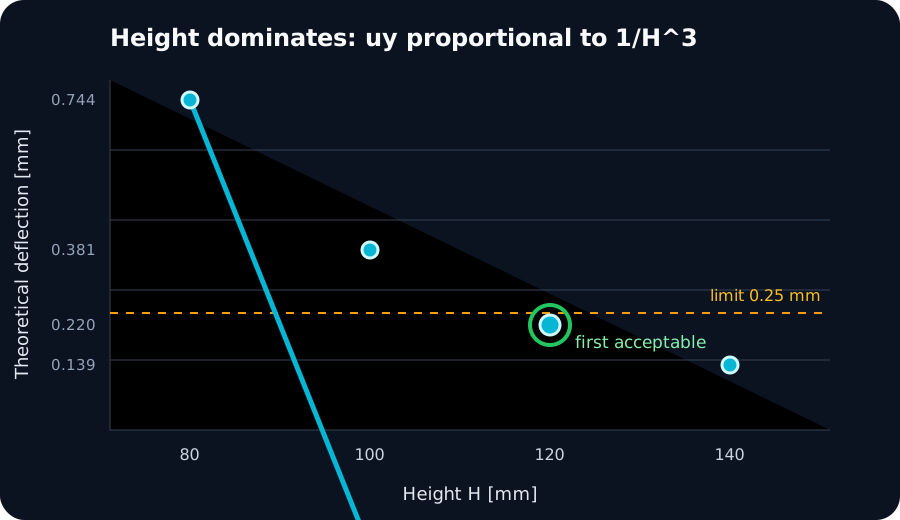
Since I ∝ H³ and uy ∝ 1/I, we obtain uy ∝ 1/H³.
Doubling the height reduces the theoretical deflection to 1/8. Save this prediction:
will be our first test.
Mental model — The script contract
We will organize the program as if it were an engineering function:
INPUTS → CHECKS → MODEL → SOLUTION → RESULTS
This separates four categories that should not be confused:
| Category | Example | So, who controls it? |
|---|---|---|
| Entry | beam_h | User or studio |
| Derivative | inertia | Program Expression |
| Reference | uy_ref | analytical model |
| Result FEA | uy_tip | Solver and post-processing |
An analytical reference is not “the correct result” by decree. It's an independent comparison, based on different hypotheses, which helps detect unit errors, loads or stiffness.
Step 1 — Find the magic numbers
Open 01_start.mac. You'll find expressions like:
MP,EX,1,210E9
BLOCK,0,1.0,0,0.10,0,0.05
ESIZE,0.025
F,ALL,FY,-1000/n_tip
The values are not incorrect, but their meaning is hidden and they appear within the instructions.
Changing the length requires finding each occurrence of 1.0 and deciding whether it represents length,
coordinate or anything else.
Gather the entries at the beginning:
! --- INPUTS: SI units ---
beam_l=1.0
beam_h=0.10
beam_b=0.05
young=210E9
nu=0.30
tip_force=-1000
mesh_h=0.025
Then replace the physical numbers:
MP,EX,1,young
MP,PRXY,1,nu
BLOCK,0,beam_l,0,beam_h,0,beam_b
ESIZE,mesh_h
NSEL,S,LOC,X,beam_l
F,ALL,FY,tip_force/n_tip
Practical rules for names
- Use names that indicate object and quantity:
beam_h, noth1. - Preserves a language and style throughout the project.
- Do not encode different units within the name if the entire contract uses a consistent system.
- Reserve names such as
ifor short loop indices. - Do not reuse an input parameter to store a result.
Step 2 — Build verifiable expressions
Calculate the inertia first:
inertia=beam_b*beam_h**3/12
In APDL, ** represents power. beam_h*3 is not an alternative form:
is another operation.
Add references:
uy_ref=tip_force*beam_l**3/(3*young*inertia)
uy_ref_abs=ABS(uy_ref)
sigma_ref=ABS(tip_force)*beam_l*(beam_h/2)/inertia
For the base case, approximately:
| Parameter | Expected value | Interpretation |
|---|---|---|
inertia | 4.1667E-6 m⁴ | Geometric property |
uy_ref | -3.8095E-4 m | Sign towards −Y |
uy_ref_abs | 0.381 mm | Magnitude of comparison |
sigma_ref | 12.0 MPa | Rated bending stress |
The Millimeter Trap
If you write beam_h=100 within this model, MAPDL doesn't know what you meant
100 mm. It will interpret 100 meters. /UNITS,SI documents the convention, but does not convert inputs.
Step 3 — Reject invalid inputs
Wait until VMESH to discover that a dimension is zero produces messages far from the cause.
It is better to check the contract immediately:
*IF,beam_h,LE,0,THEN
  /COM,ERROR: beam_h must be positive
  /EOF
*ENDIF

*IF,mesh_h,GT,beam_h/2,THEN
  /COM,WARNING: mesh_h is larger than beam_h/2
*ENDIF
The first block represents an error that prevents you from continuing. The second is a warning: the model can be executed, but cross discretization deserves attention.
Controlled Experiment
- Temporarily change
beam_hpractically zero. - Run the script.
- Check that no geometry is created.
- Restaura.
beam_h=0.10.
Don't celebrate that MAPDL “failed correctly.” Celebrate that your program spotted the issue before handing over absurd data to the modeler.
Step 4 — Store data in arrays
We want to test four heights without creating four independent parameters:
*DIM,heights,ARRAY,4
heights(1)=0.08
heights(2)=0.10
heights(3)=0.12
heights(4)=0.14
*DIM reserve an array. Each position contains an alternative. The array describes data;
still doesn't indicate what to do with them.
Step 5 — Iterate through alternatives with *DO
*DO,i,1,4
  trial_h=heights(i)
  trial_i=beam_b*trial_h**3/12
  trial_uy=ABS(tip_force)*beam_l**3/(3*young*trial_i)
  trial_stress=ABS(tip_force)*beam_l*(trial_h/2)/trial_i
*ENDDO
The Index i successively takes the values 1, 2, 3 and 4. On every lap,
trial_h represents a different height. Analytical calculation costs practically nothing;
that's why it's a good place to learn loops. Running a full simulation on each lap will arrive at M09.
Step 6 — Convert limits to a decision
passes=0
*IF,trial_uy,LE,uy_limit,THEN
  *IF,trial_stress,LE,stress_limit,THEN
    passes=1
    *IF,selected_h,EQ,0,THEN
      selected_h=trial_h
    *ENDIF
  *ENDIF
*ENDIF
selected_h starts at zero. It's only updated for the first valid alternative,
so at the end it contains the lowest admissible height of an ordered array.
| Height | Deflection | Stress | Status |
|---|---|---|---|
| 80 mm | 0,744 mm | 18,75 MPa | Fails deflection limit |
| 100 mm | 0,381 mm | 12,00 MPa | Fails deflection limit |
| 120 mm | 0,220 mm | 8,33 MPa | Complies |
| 140 mm | 0,139 mm | 6,12 MPa | Complies |
The first valid candidate is 120 mm.
Step 7 — Write reusable evidence
A table is more useful than values buried in the output:
*CFOPEN,m01_design_table,csv
*VWRITE
('height_m,uy_ref_m,sigma_ref_pa,passes')

! Inside the loop:
*VWRITE,trial_h,trial_uy,trial_stress,passes
(E16.8,',',E16.8,',',E16.8,',',F2.0)

*CFCLOS
When executing the deliverable, it will appear m01_design_table.csv on the Working Directory.
Open it in a text editor before taking it to a spreadsheet: you must be able to understand its structure without relying on another application.
Bug hunt
Download 01_bug_hunt.mac.
Don't run it yet. Find five flaws:
- A height expressed in incompatible units.
- An impossible mesh size.
- A power written as multiplication.
- An incorrectly signed stress magnitude to compare with a limit.
- A geometry that ignores the parameter block.
For each defect write: probable symptom, cause and minimal correction.
Verifiable challenge
Open 01_challenge.mac
and complete ALL four of THEM.
- Add a fifth height of your choice.
- Walk through the five alternatives without duplicating the expressions.
- Identify the first alternative that satisfies both deflection and stress limits.
- Generate a CSV with inputs, references, and status.
Acceptance criteria
uy_refbase differs less than the 0,1 % of3.8095E-4 m.sigma_refbase differs less than the 0,1 % of12 MPa.- When doubling height:
uy_nuevo/uy_base = 0.125 ± 0.001. - A negative entry is rejected before `/PREP7`.
- The CSV contains one row per alternative and can be played.
Self-assessment
Why is beam_h an input and not inertia?
Because height is chosen by the user, while inertia is derived from geometry by an expression.
What is the difference between uy_ref and a FEA offset?
uy_ref comes from beam theory; the displacement FEA comes from the discrete model and its hypotheses.
What does ** mean in a APDL expression?
It is the power operator; beam_h**3 represents the cube of the height.
Why validate before/PREP7?
To stop the program close to the cause and prevent geometry or solver from receiving impossible inputs.
Why don't we run four FEAs inside the loop?
M01 focuses on logic and cheap pre-dimensioning. Automating complete simulations requires controlling reconstruction, results, and files, and is addressed in M09.
Evidence of learning
01_parametric_beam.macexecuted from a clean session.m01_design_table.csvwith four alternatives.- Archive the challenge with a fifth alternative.
- Table "defect → symptom → causes → correction" of the bug hunt.
- Prediction and explanation of the
1/8ratio obtained by doubling the height.
Validation checklist
- I gathered all the physical entries into a documented block.
- I eliminated the magic numbers of geometry, material, mesh, and charge.
- I distinguish entries, derivatives, references and results FEA.
- The script rejects non-positive dimensions and mesh.
- The CSV matches the expected results within tolerance.
- The first valid height of the base assembly is 120 mm.
- I completed the bug hunt and challenge without using the GUI.
Next
Your model is already accepting input and making decisions. In M02 you will solve a more subtle problem: apply loads and constraints without relying on node numbers that change when modifying geometry or mesh.